Automatic Rounding is here for RoundHoop! POS
RoundHoop POS now supports automatic rounding! No more manual tapping - RoundHoop will now automatically scan the cart during checkout and inject the correct Round Up or Round Down adjustment dynamically.
We’ve been listening closely to your feedback, and we’re thrilled to announce our highly-requested feature for RoundHoop POS: Automatic Rounding!
You no longer need to manually tap a tile to apply your rounding rules at checkout. RoundHoop can now sit in the background and instantly apply your active rounding preferences automatically as items are added to the cart!
Here’s everything that’s new in this update:
Download the App from Shopify : Roundhoop - Cash rounding made easy on POS
Video Demo
Watch this 60-second walkthrough to see the new Pinned Tiles feature in action:
What's New?
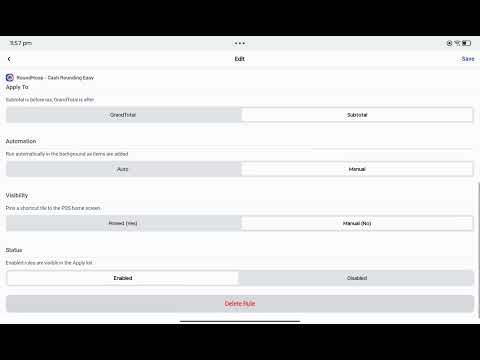
✨ Fully Automated Cash Rounding When creating or editing a rounding rule, you can now toggle "Automation" to "Auto". Once configured, RoundHoop will automatically scan the cart during checkout and inject the correct Round Up or Round Down adjustment dynamically, eliminating the extra tap for your cashiers!
🧮 Precision Logic Whether you apply adjustments to the Subtotal (before tax) or the GrandTotal (after tax), and whether you choose to Round Up or Round Down, our background automation cleanly handles the math without getting confused by existing adjustments or Shopify's native tax engines.
🛠️ Simplified Management UI We’ve also streamlined how you interact with RoundHoop in the POS app. The "Manage" screen and "Apply" screen have been merged. Tapping the RoundHoop tile now gives you an instant, unified view of all your configurations where you can either manually apply a rule or edit its settings in one place.
How to get started:
Open the RoundHoop tile in your Shopify POS app. Tap an existing rule (or click Create Rule) and set the new Automation segment to "Auto". Important: Make sure to fully close and restart your Shopify POS app to initialize the new background watcher.