Display Matching Fees Banner on Product Pages
Customization: Show Fees Banner when product has fee aligned to it on Product pages

Requirement
If you ever wanted to showcase the fee LABEL/BADGE on your product page? This will surely help in many ways and works intelligently.
- 1. Giving user's consent before purchasing.
- 2. Complying with Legal Rules (EU GDPR)
- 3. Shows the fee which is assigned to the particular product, if no fee is assigned to it will not appear.
For the above reason, we thought to publish this feature to the app & its finally here , Thanks & shout out - to sweet-street.de store, for allowing us to know it better.
Demo
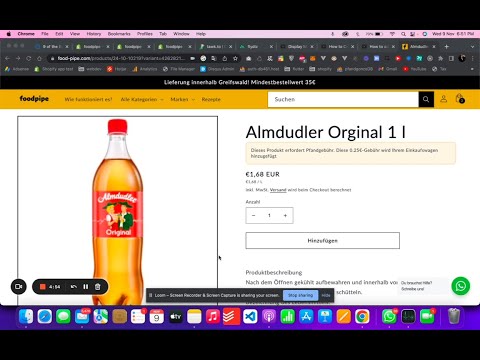
Installation (Recommended)
1. Open Online Store → Customize. 2. Go to a product page template. 3. Click Add block and select Fee notice. 4. Drag the block where you want it to appear (usually near the price or add-to-cart).
The block will always show inside the theme editor for easy styling. On the live storefront it will only appear if the product has a fee assigned.
Tokens
You can use these tokens in both Header text and Content:
{feename}→ fee name{feeprice}→ fee price
Example:
Header text: Additional fee for {feename}
Content: An additional fee of {feeprice} will be added to the cart for this product.
Manual Installation (Legacy)
If you prefer manual theme edits, place this block in your product template (e.g., main-product.liquid):
<div class="pfandfee_label"
  borderColor="#f8ca79"
  bgColor="rgba(248,202,121,.2)"
  textColor="#002133"
  headerText="Additional fee for {feename}"
  headerTextColor="#002133"
  headerBgColor="#9ad0ff"
  borderRadius="12"
  feetxt="An additional fee of {feeprice} will be added to the cart for this product."
></div>
Customization Notes
borderColor,bgColor,textColor,headerTextColor,headerBgColoraccept hex or named colors.borderRadiusaccepts a number (px).- Tokens
{feename}and{feeprice}are supported in bothheaderTextandfeetxt.